Easy Ways Screencapture Or Screenshot In Asus Zenfone 2
Easy Ways Screencapture Or Screenshot In Asus Zenfone 2 -How to take a screenshot or a smartphone Asus Zenfone, especially to 2 ?. Easy enough. In addition to using Android, Asus has already integrate this functionality in the flagship smartphone. Find out how below.
To to take screenshots on Asus Zenfone 2 The first is using the recent apps menu or button. How to do?. then simply press the top of the parameters "setting of the latest applications." Next is enabled and select "Tap and hold to capture screen". If the function is activated, you simply press and hold the menu button or recent applications in the lower right corner long enough to get the capture / photo on the screen Zenfone 2 is yours.

How Screenshot Asus Zenfone 2 Using the menu button.
How to screencapture second Asus Zenfone 2 similar to how screenshots OPPO phone. This method is the simplest, fastest and has become a standard in many Android-based phones. You just press a combination of power button and to reduce the volume simultaneously for about 1 second. screenshot and directly if stored immediately in the / storage / internal Screenshots.

Keystroke For megambil Screenshot On Asus Zenfone 2 .
But if one day one of the power button or volume problems, you can use the first way forward and a third path below.
Read :. how screenshots of Windows Phone
The third way to take screenshots on Asus Zenfone 2 is to add a screen capture button on the panel quick adjustment. This panel can be accessed by pulling the notification of the columns from the top of the screen. To add a screen capture button, just press the pen display icon and change the paper in the top panel of rapid adjustment Zenfone 2.

See the list of the tool then scroll down and find the icon screen shot of it. Next please press or a check box that appears next to the icon, then save.

Well, take a screenshot Asus Zenfone 2 screen, you simply move the panel and rapid adjustment is readily available, it screenshot button as shown below.
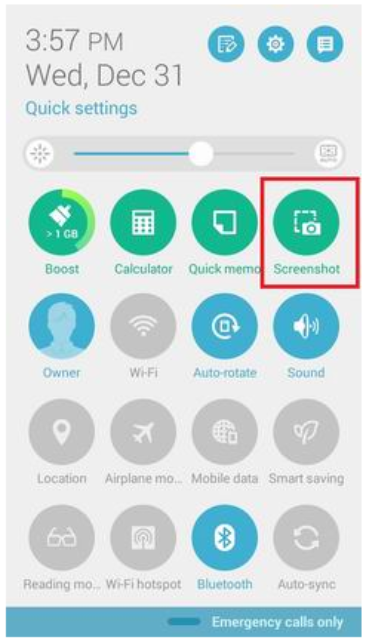
Screencapture Asus Zenfone 2 from the Quick Settings menu
Source and screenshot Asus Zenfone 2 images :. Asus - Asus screen
results. the default shot will be saved in the folder / storage / internal Screenshots. How easy is not enough, or you got another way to take a screenshot in Zenfone 2 ?, Please share on Facebook comments field below.
Read also: ways screenshots on Android phones

0 komentar:
Posting Komentar